


What Makes a Well-Designed Industrial Control Panel HMI?
HMI design serves as the critical bridge between operators and the machinery they control. A well-designed interface not only improves efficiency but also keeps operators informed and enhances overall workplace safety. In industrial environments, effective industrial HMI design is essential to maximizing system performance, usability, and reliability.
Applying proven HMI design principles and HMI design best practices ensures operators can easily monitor and control equipment with confidence. A well-executed custom HMI interface design further enhances this by tailoring the system to specific processes and user needs.
Explore this guide to better understand the key principles of effective HMI design and ensure you get the most value from your custom solution with Bevco Engineering.
What is HMI?
A Human-Machine Interface (HMI) serves as the bridge between an operator and a machine or process. It is the visual and interactive component that allows users to monitor, control, and engage with equipment in real time. By presenting data in a clear, user-friendly format, an HMI helps operators make informed decisions quickly and efficiently.
Modern HMIs go beyond traditional buttons and switches. Today’s interfaces often feature touchscreens, intuitive graphics, and streamlined layouts that enhance usability and improve the overall user experience. Many systems also support remote monitoring, allowing operators to access and adjust operations without being physically on-site.
In addition, HMIs play a critical role in safety and performance. They provide visibility into complex system data, highlight critical alarms, and support emergency controls—helping create a safer and more responsive work environment.
The Cost of Having a Bad HMI Design
Operators often rely on HMI systems for extended periods, 8, 10, or even 12 hours a day, making usability and clarity essential. While HMI screens aren’t designed to win graphic design awards, they serve a critical function in maintaining operational efficiency and safety.
When an HMI is poorly designed, the consequences can be significant. Confusing layouts or unclear data can lead to production delays, increased equipment wear, and frequent maintenance issues. More importantly, a lack of visibility into system status or critical alerts can increase the risk of operator error and workplace injuries.
Because HMIs play such a vital role in daily operations, it’s important to work with an engineering partner who understands how to design interfaces that are intuitive, reliable, and built with safety in mind.
Core HMI Design Principles
1. User-Centered Design
An effective HMI is designed with the operator’s needs, tasks, and environment in mind. This requires close collaboration with those who understand the day-to-day operation of the equipment. When an interface is tailored to the user, it improves clarity, reduces errors, and supports safer decision-making—especially in critical situations.
2. Keep Normal Operations Visually Simple
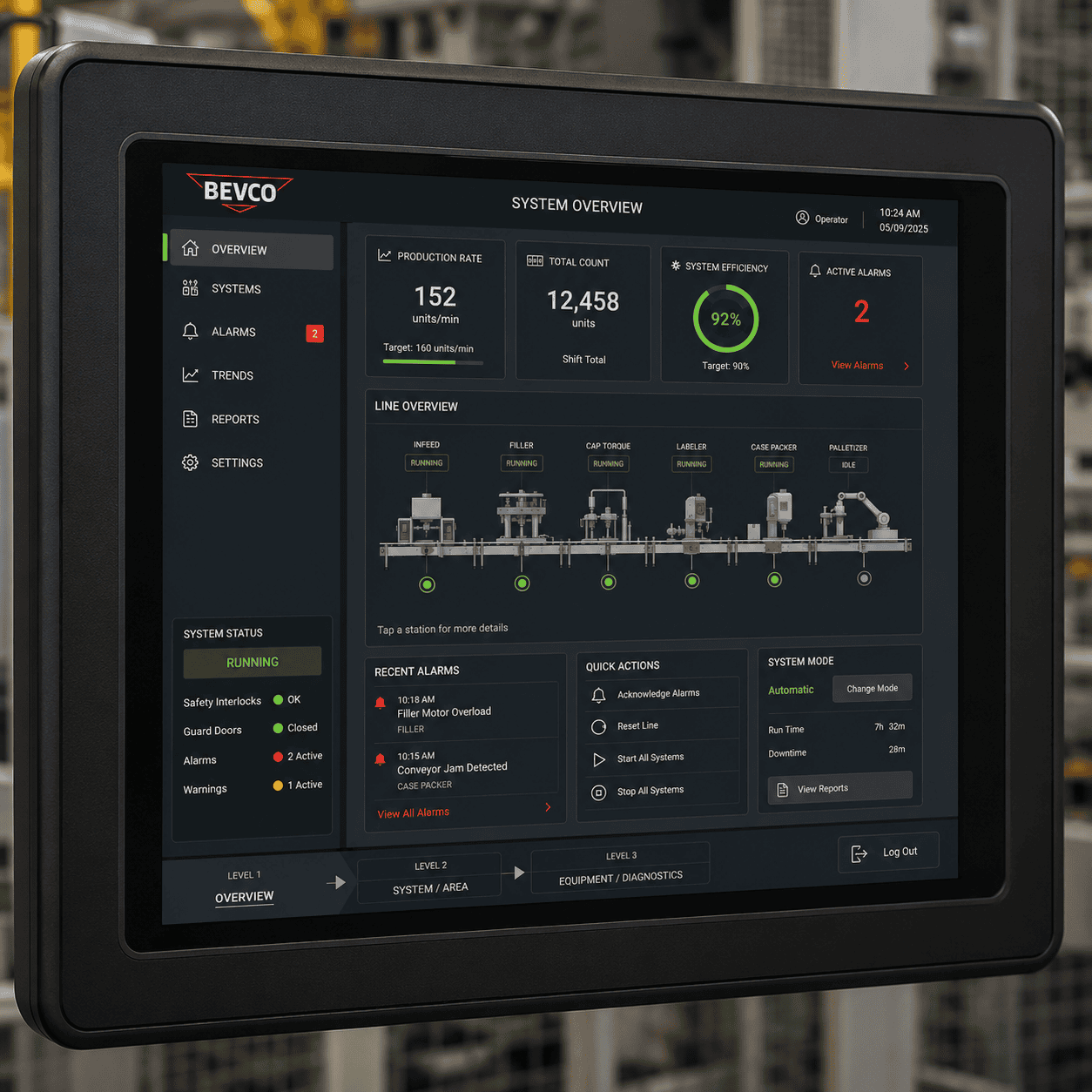
A well-designed HMI should appear calm and “uneventful” during normal operation. Rather than using excessive colors or movement, the interface should rely on neutral tones and a clean layout that is easy to read at a glance. This approach prevents cognitive overload and allows abnormal conditions to stand out immediately when they occur.
3. Use Color with Purpose
Color in HMI design should be used intentionally—not decoratively. Neutral colors such as grays and muted tones should dominate the interface, while brighter colors like red, yellow, or orange should be reserved for warnings, alarms, or conditions that require immediate attention. Clear and consistent use of color helps operators quickly recognize issues and respond appropriately.
4. Prioritize and Structure Information
Operators should not be overwhelmed with all system data at once. Instead, information should be organized using a clear hierarchy that allows users to navigate from high-level overviews to detailed diagnostics.
A typical HMI hierarchy includes:
Level 1: Overview: A high-level view of the entire system, showing overall status, key performance indicators, and major components. This screen should allow operators to quickly assess system health and navigate to deeper levels.
Level 2: System or Area Control: Focused views of specific subsystems or areas of the machine, providing more detailed monitoring and control while still maintaining clarity.
Level 3: Detailed Diagnostics: In-depth screens for individual components, offering detailed data, advanced controls, and troubleshooting information.
5. Design for Intuitive, Real-World Interaction
An HMI should reflect the physical layout of the system it represents. Placing elements in positions that mirror real-world equipment helps operators interact with the interface more intuitively. For example, selecting a tank on the screen should provide access to its levels and controls, just as an operator would expect in the physical environment. This alignment reduces confusion and improves efficiency.
Design Smarter HMI Systems
A well-designed HMI can improve safety, efficiency, and operator confidence while supporting long-term system performance. Partner with Bevco Engineering to build an interface tailored to your process, your equipment, and the people using it.